
Блог переводчика-провизора
О фармацевтическом переводе и не только
Dose, dosage, доза, дозировка |
||||
|
Доза — количество лекарственного препарата (действующего вещества) на один прием. Слово «дозировка», по-видимому, происходит от слова «дозировать» и обозначает не только количество ЛП на один прием, но и количество приемов, продолжительность применения и пр. (все указания врача по приему препарата). Надо сказать, что «дозировка» — термин более расплывчатый, нежели «доза». Суточная, курсовая, терапевтическая, высшая разовая, высшая суточная… — все это дозы, а не дозировки. Но иногда слово «дозировка» употребляют и в значении «доза». Переводчикам я советую для ясности этого избегать. Запомнить различие достаточно просто. Доза — это только количество. Дозировка — это процесс (продолжительность, кратность приема), дозирование. Под дозировкой также понимают содержание действующего вещества в единице лекарственной формы (таблетке, капсуле, суппозитории и пр.). В английском, к счастью, dose соответствует дозе, а dosage — дозировке (см. пояснение на английском). Дозирование — dosing. И еще: Dosing regimen (dosage regimen) — режим дозирования. Включает в себя все то, что входит в понятие «дозировка». Dose adjusment — коррекция дозы (пациент принимал 5 мг 2 раза в день, а стал принимать 10 мг, но также 2 раза в день). Dosage adjustment (dosing adjustment), соответственно, будет переводиться как «коррекция дозировки» (например, изменяется кратность приема препарата). Хотя, если задуматься, коррекция дозировки в итоге все равно приводит к коррекции дозы (только не разовой, а суточной или курсовой, например). Может, поэтому чаще говорят все-таки о коррекции дозы? Если не уверены в деталях, пишите лучше «коррекция дозы». |
||||
|

The step‑by‑step section only covers how to request an FRP Link from the official GSMPLUSVIP service. It does not provide instructions for bypassing FRP on devices you do not own.
This section describes the . The actual link activation must be performed on the locked phone you own.
+-------------------------------------------------------+ | Android OS File System | | | | +--------------------+ +--------------------+ | | | User Partition | | FRP Partition | | | | (Wiped during standard| | (Persists through | | | | Factory Reset) | | Factory Reset) | | | +---------+----------+ +---------+----------+ | | | | | | v v | | Fresh Setup Wizard <-------- Checks Secure State | | (Demands Original Google ID and Password to Proceed)| +-------------------------------------------------------+
Tap Emergency Call, dial a local emergency number, quickly access the keypad/notes options during the call, and type a URL like ://youtube.com to click through.
Generally, these tools use a few common technical methods to bypass FRP:
The term refers to a popular repository of web links, tools, and shortcuts designed to bypass this verification screen. This comprehensive guide covers what GSMPLUSVIP is, how its links work, and the step-by-step methods to use them safely. What is GSMPLUSVIP?
The GSMPLUSVIP FRP link simplifies the often tedious process of unlocking a Google-locked Android phone by centralizing system shortcuts in one accessible location. By understanding how to safely navigate to the site and which settings to trigger, users can regain control of their hardware without paying expensive technician fees.
Factory Reset Protection (FRP) is a built-in defense mechanism that activates the moment you add a Google account to your Android phone. If the device is ever wiped or reset via recovery mode, FRP triggers. It requires you to enter the exact username and password of the Google account that was previously synced on the device.
To temporarily access a functional home screen.
The phone will prompt you to protect your device. Select or PIN . Draw a new, memorable pattern and confirm it. Restart your phone.
Англоязычные интернет-ресурсы по анатомии, физиологии и патологии нервной системы человека |
||||
|
Организаторы курса Medical Neuroscience и студенты собрали множество полезных ресурсов по неврологии. Хочу поделиться с вами наиболее ценными из них. Все ресурсы на английском (есть два платных, остальные бесплатные). Сразу оговорюсь, что я далеко не все подробно изучала. Учебники — основной учебник курса под названием Neuroscience (5-е издание 2012 г.). В рунете можно найти отсканированное предыдущее издание (2008 г.). Книга дополняется сайтом, где, уже бесплатно, можно посмотреть анимации по многим тематикам и пройти тесты по книге. Там же есть толковый словарь; — онлайн-учебник по неврологии Техасского университета. У меня почему-то в Chrome не хватает плагинов для просмотра интерактивных элементов (и не пишут каких). Может, кто-нибудь подскажет, как с этим справиться? — еще два онлайн-учебника, Колумбийского университета и Вашингтонского университета. На любой вкус :). Анатомия — интерактивный анатомический атлас Sylvius 4, доступ платный. Атлас разработан авторами книги, и преподаватель Medical Neuroscience пользуется им на лекциях. Я доступ к атласу не покупала, потому что не было времени его изучать, но сделано все очень хорошо. Впрочем, есть и множество бесплатных ресурсов; gsmplusvip frp link — атлас ствола головного мозга; — анатомия поверхности головного мозга в 3D. Сайт http://www.g2conline.org/, раздел 3D Brain; — еще один интерактивный атлас головного мозга и спинного мозга (МРТ, гистология, объемные препараты, 3D); — атлас головного мозга (срезы, гистология, МРТ, 3D и многое другое); — и еще один интерактивный атлас (Колумбийский университет. Интересно, у нас сколько университетов, создающих подобные ресурсы?); — модель головного мозга в 3D, программа для компьютера; The step‑by‑step section only covers how to request — еще одна 3D-модель головного мозга; — еще одна 3D-модель и много других анимаций по работе нервной системы; — снова МРТ головного мозга (Дюкский университет, организаторы курса); — анатомия головного мозга в срезах; — презентация по анатомии спинного мозга; The actual link activation must be performed on — атлас головного мозга в период эмбрионального развития; — своеобразный интерактивный учебник, который можно использовать для проверки знаний (Университет Юты). Патология — презентации: поражения ствола мозга и спинного мозга; — анатомия головного мозга с кратким экскурсом в патологию; И в качестве бонуса — подкасты по неврологии на NEURO.tv. |
||||
|
Терминология клинических исследований |
||||
|
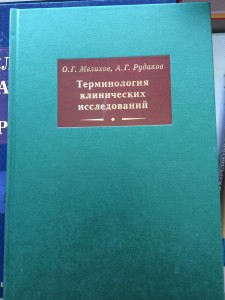
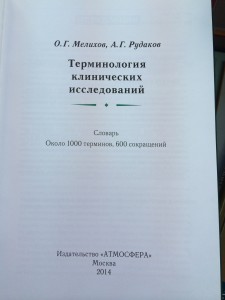
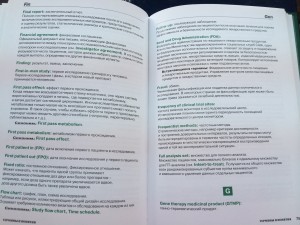
Увидела сегодня в Доме книги на Фрунзенской англо-русский словарь по клиническим исследованиям. Вышел в 2014 г., издан качественно (в руках держать приятно), небольшого формата. Ниже фотографии из магазина:
В Доме книги он стоит (внимание!) 1705 руб. (Пруф.) На сайте издательства — 900 руб, а за 350 руб. можно купить электронную версию в pdf (что я и сделала; дополню пост, когда получу файл). Я это выяснила за 2 минуты, стоя в магазине :). У тех же авторов есть еще книга по клиническим исследованиям, стоит столько же. Я еще тоже купила в комплект к словарю, потом поделюсь впечатлениями. |
||||
|
Gsmplusvip Frp Link 📥
The step‑by‑step section only covers how to request an FRP Link from the official GSMPLUSVIP service. It does not provide instructions for bypassing FRP on devices you do not own.
This section describes the . The actual link activation must be performed on the locked phone you own.
+-------------------------------------------------------+ | Android OS File System | | | | +--------------------+ +--------------------+ | | | User Partition | | FRP Partition | | | | (Wiped during standard| | (Persists through | | | | Factory Reset) | | Factory Reset) | | | +---------+----------+ +---------+----------+ | | | | | | v v | | Fresh Setup Wizard <-------- Checks Secure State | | (Demands Original Google ID and Password to Proceed)| +-------------------------------------------------------+
Tap Emergency Call, dial a local emergency number, quickly access the keypad/notes options during the call, and type a URL like ://youtube.com to click through.
Generally, these tools use a few common technical methods to bypass FRP:
The term refers to a popular repository of web links, tools, and shortcuts designed to bypass this verification screen. This comprehensive guide covers what GSMPLUSVIP is, how its links work, and the step-by-step methods to use them safely. What is GSMPLUSVIP?
The GSMPLUSVIP FRP link simplifies the often tedious process of unlocking a Google-locked Android phone by centralizing system shortcuts in one accessible location. By understanding how to safely navigate to the site and which settings to trigger, users can regain control of their hardware without paying expensive technician fees.
Factory Reset Protection (FRP) is a built-in defense mechanism that activates the moment you add a Google account to your Android phone. If the device is ever wiped or reset via recovery mode, FRP triggers. It requires you to enter the exact username and password of the Google account that was previously synced on the device.
To temporarily access a functional home screen.
The phone will prompt you to protect your device. Select or PIN . Draw a new, memorable pattern and confirm it. Restart your phone.


© 2026 Vivid Yard